Change Language Top Menu Main Menu Search Digital Banking Page Content Footer
Personal Gold Private Business Group
GR EN
alphaBank_logo
Digital banking
  • Personal
  • Business
  • Open account

How can we help ?

Search for what interests you.

Branch Network myAlpha Rendez-vous Support Center
ΕΛΛΗΝΙΚΑ
Discover digital banking
Digital banking credentials
1st account
Online products
  • Accounts
  • Term deposits
  • Personal loans
  • Mortgages and home loans
  • Debit cards
  • Credit cards
  • Prepaid cards
  • Insurance plans
  • Transaction packages
  • Pocket money online
Transactions and wallets
  • Money transfers
  • Instant transfers
  • Payments
  • IRIS payments
  • Digital wallets
Other online options
  • Detail updating
  • Documents and requests
  • Alerts
  • e-statements
  • Tax deductions
  • Strong authentication
  • Profile and security settings
  • Joint holder addition
Banking anywhere, any time
  • Mobile app
  • Web banking
  • Phone banking
  • Digital banking training
  • News and articles
Find out about cards
Credit cards
  • Bonus Visa
  • Bonus Visa Gold
  • Aegean Bonus Visa
  • Aegean Bonus Visa Premium
  • Platinum Bonus Visa
  • Platinum Bonus Mastercard
  • Luxury Card Kalogirou Bonus Mastercard
  • Affinity Mastercard
  • Energy Mastercard
  • Vodafone Bonus Mastercard
Debit cards
  • Enter Bonus Visa
  • Aegean Bonus Visa
  • Enter Visa
Prepaid cards
  • bleep Smile Visa
  • Prepaid Mastercard
  • Pocket money online
Cards for state-aid benefits
  • Youth Pass
  • Benefits card
  • Tourism for all 2026
Digital wallets
  • Google Pay
  • Apple Pay
  • Xiaomi Pay
  • Garmin Pay
  • Samsung Wallet
Card management options
  • Insurance plans
  • Disputing a transaction
  • Activating a card online
  • Getting a new card PIN
  • Secure online shopping
  • Virtual use of card before receiving it
  • Click to Pay
  • Visa+
  • Alerts
  • e-statements
Replacing Mastercard with Visa
Find out about accounts
Current accounts
  • 1st account
  • Premier account
  • Current account
  • For payroll
  • For pension
  • For young adults aged 18-27
Savings
  • Smart Save
  • For children up to 14
  • For teenagers aged 15-17
In foreign currency
  • Current account
  • Sight account
IBAN information
Closing an account
Find out about borrowing
Personal loans
  • Up to €3,000
  • Up to €100,000
  • For electric car
  • Student loan
  • Overdraft
  • Debt consolidation
  • Repayment tailored to you
Mortgages and home loans
  • First Home
  • Residence
  • With cash collateral
  • Convert Swiss franc loans into euro
  • Spiti mou ΙΙ
  • Spiti mou
Home improvement
  • Residence Renovation
  • Upgrade my home
  • Green loan
  • Renovate my home – for young people
  • Exoikonomo 2023
All green loans
Find out about investments
Mutual funds
  • Alpha Asset Management MFMC
  • onemarkets Fund by UniCredit
  • Smart Investment Portfolios
Term deposits
  • Simple
  • With Bonus
  • Online
  • Online with Bonus
  • Monthly progress
  • Progress plus
  • Extra Profit structured
Equities and stock exchanges
  • ALPHATRADE
Investment plans and combined investment products
  • Alpha Plus
  • Alpha Dimiourgo
  • Dual Currency
  • 4Y Participation on MXESSDID Index in EUR
Bonds
Find out about insurance plans
Health
  • Hospitalisation plan
  • Outpatient plan
Home and car
  • Home
  • Home contents
  • Home construction
  • Car
Cards, loans and online transactions
  • Credit card balance
  • Online transactions
  • Stolen or lost card
  • Mortgage loan
  • Personal loan
Unit-linked and savings plans
  • Exelixis Capital Creation
  • Exelixis Capital Investment
  • Life Plan pension and children’s savings plan
  • Prospect pension and children’s savings plan
Find out about Bonus loyalty
Major partners
Partner businesses
Redemption offers
Collecting Bonus points
Bonus exclusive
News
My Bonus account
Bonus app
Terms and conditions
Discover solutions for international clients
Meet your match
  • Greek nationals abroad
  • Foreign nationals or non-dom
  • Golden Visa
  • Working in Greece
Banking with Alpha Bank
  • Remote account opening
  • Mortgage loan
Beyond banking
  • Living and investing
  • Premium residences
  • Third-party services

How to use the virtual Market Pass Visa card

    • Support Centre
    • Support Centre
    • How to use the virtual Market Pass Visa card

    Through your digital wallet or online

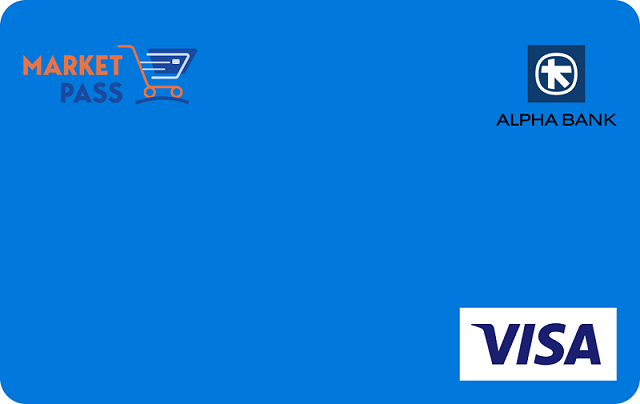
    You can use the aid amount that is credited to your virtual Market Pass Visa to buy any type of product from retail food stores or farmers’ markets.

    • At POS devices, by adding your card to an Apply Pay or Google Pay digital wallet through myAlpha Mobile. Find out how you can add the card to your digital wallet.
    • Online, using your card details. To view the card details (card number, expiry date and CVV), log into myAlpha Mobile and choose Cards > Card Details.

    I bank with Alpha Bank and have e-Banking credentials

    To get access to your virtual Market Pass Visa card:

    1. Download the myAlpha Mobile app if you have not already installed it on your phone.
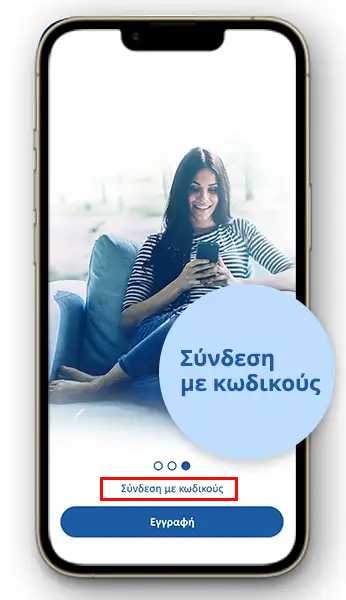
    2. Choose “Login with credentials” on the app to log in using your e-Banking credentials (Username and Password).
    3. Find your new virtual Market Pass Visa card on the overview page (under “Cards”).
    4. Choose “Add to Google Pay” or “Add to Apple Wallet”, to add it to the digital wallet you prefer.

    Attention: You cannot add the Market Pass to myAlpha Wallet.

    I bank with Alpha Bank and don’t have e-Banking credentials.

    To use your new virtual Market Pass Visa card, you get your e-Banking credentials (Username and Password) by email/SMS on the contact details you have provided to Alpha Bank.

    Through e-Banking, you will be able to view all the products you hold with Alpha Bank. When you activate your e-Banking, you fully and unconditionally accept the e-Banking terms of transactions.

    To get access to your virtual Market Pass Visa card:

    1. Download and install myAlpha Mobile  on your mobile phone.
    2. Choose “Login with credentials” on the app to log in using the e-Banking credentials you received by email/SMS. Do not choose “Sign up to e-Banking” or “New customer”.
    3. Find your new virtual Market Pass Visa card on the overview page (under “Cards”).
    4. Choose “Add to Google Pay” or “Add to Apple Wallet”, to add it to the digital wallet you prefer.

    Attention: You cannot add the Market Pass to myAlpha Wallet.

    I do not bank with Alpha Bank

    To use your new virtual Market Pass Visa card, you get e-Banking credentials (Username and Password) by email/SMS on the contact details you provided in your Market Pass application at vouchers.gov.gr.

    If you have chosen Alpha Bank to have a virtual card issued for the Tourism-For-All Pass, you must use the e-Banking credentials you had obtained then. If you have forgotten them, see how to recover your credentials online.

    To get access to your virtual Market Pass Visa card:

    1. Download and install the myAlpha Mobile app on your mobile phone.
    2. Choose “Login with credentials” on the app to log in using the e-Banking credentials you received by email/SMS. Do not choose “Sign up to e-Banking” or “New customer”.
    3. Find your new virtual Market Pass Visa card on the overview page (under “Cards”).
    4. Choose “Add to Google Pay” or “Add to Apple Wallet”, to add it to the digital wallet you prefer..

    Attention: You cannot add the Market Pass to myAlpha Wallet.

    Download the myAlpha Mobile App

    Pin, Fingerprint & Face ID for fast and easy login

    IRIS Payments for instant money transfers and payments in e-shops

    Locate the nearest Alpha Bank Branch

    Be informed about the Bonus points of your cards

    GooglePlay AppStore AppGallery

    Learn more about the Alpha Bank digital wallets
    Google Pay
    Apple Pay

    FAQs

    FIND OUT MORE

    Need additional help?
    Market Pass call centre:
    2111073827
    Working hours:
    Monday to Friday, 09:00-17:00
    Download mobile app
    • Download the app from Google Play.
    • Download the app from the App Store.
    • Download the app from the App Gallery.

    Useful links

    Our services

    • Branch appointment
    • Digital assistant
    • Personal digital banking
    • ATM
    • APS

    Getting in touch

    • All contact methods
    • Filing a complaint
    • Branch opening hours
    • Business centres

    Banking online

    • 1st personal account
    • 1st business account
    • Online products
    • Business legalisation

    Emergency help

    • Lost / Stolen card
    • Lost / Forgotten password
    • Captured card at ATM
    • Stolen credentials

    Price lists / Bulletins

    • Banking transaction terms
    • Price lists and transaction terms
    • Mutual fund prices
    • FX price bulletin
    • Stock info

    Tools

    • IBAΝ info
    • BIC / SWIFT
    • Loyalty points
    • Mortgage loan calculator
    • Personal loan calculator

    Useful info

    • Supporting documents
    • Deposit and investment guarantee fund
    • Primary residence protection
    • Credit score
    • Relations with credit institutions
    • Data transfer to IAPR
    • Certified employees

    Important notices

    • Regulatory framework
    • Payments within Europe
    • MiFID
    • Personal data protection
    • Image data processing
    • Facebook data deletion
    +30 210 326 0000

    Call Centre

    Branch finder

    Branches, ATM, APS

    Support Centre

    FAQs and security tips

    Appointment

    At a branch

    Social media

    Follow us
    • Gold
    • Private
    • Business
    • Group
    • Sitemap
    • Cookies Policy
    • Personal Data Protection
    • Terms of use
    • Copyright 2026© ALPHA BANK