Branch Network

Money transfers

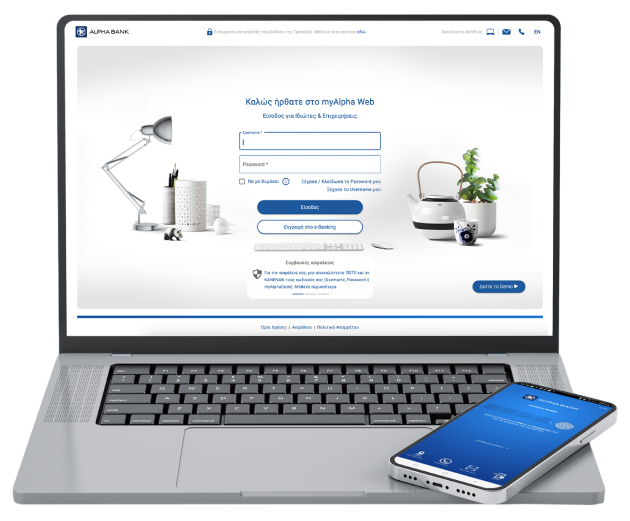
Transfer money online from your mobile with myAlpha Mobile or your computer with myAlpha Web. Make payments in Greece and abroad, in euro or foreign currency, wherever you are.

Transfer money on the spot

To Greece and abroad
Transfer money to accounts in Greece and all over the world, in euro and 20 foreign currencies.
Hassle-free
You don’t have to wait in line at the bank or use an ATM or APS.
Perfectly secure
Confirm with biometrics or PIN on your mobile, or push notification or 6-digit code on your computer.

How e-Banking transfers make banking easier

Have a look at how easy it is to transfer money from your mobile or computer. 

To Greece and 200+ countries

Transfer money to accounts at:

  • Alpha Bank, held by you or anyone else 
  • Other banks in Greece, provided that they are in the DIAS interbanking system
  • Foreign banks, at more than 200 countries all over the world

See the list of countries where you can transfer money.

In euro and 20 foreign currencies

Transfer money to and from accounts in euro or in 20 foreign currencies.

 
Tip: Did you change your mind about a transfer or the details you entered are incorrect? You can cancel it through myAlpha Web, provided it has not gone through yet. 

By charging an account

Transfer money from any of your accounts that are linked to your e-Banking.


By charging your credit card or loan 

Transfer money by charging your credit card (cash advance) or your loan at Alpha Bank, provided you have transferred the money to another account at Alpha Bank, held by you or anyone else.

 
Tip: Find and download proof of your transfers and your transfer history  from myAlpha Web or myAlpha Mobile.

Immediate transfer 24/7 if  you...

Transfer euro to an account at:

  • Alpha Bank, held by you or anyone else.
  • Another bank in Greece or abroad that is in the SEPA, if the amount is up to €50,000 and you are charged with immediate transfer fees. 

On the next business day if you...

  • Transfer money to another bank in Greece or abroad in euro or foreign currency.
  • Carry out the transaction by 22.00. 

At a selected date if you...

  • Have sufficient balance in your account on that day.
 
Tip: Choose “Block the amount” to secure the amount in your account, without losing any interest.

To an Alpha Bank account free of charge

You don’t get charged any fees to transfer money to Alpha Bank accounts, held by you or anyone else. 

To an account at another bank in Greece

You may choose who pays the fees:

  • Fees are shared (SHA) – You only pay the fees for Alpha Bank, €0.50 for amounts up to €5,000. 
  • Fees are borne by the sender (ΟUR) – You pay the fees for Alpha Bank and the other bank. 
 
 
Tip: Choose IRIS payments to transfer up to €500 free of charge to an account held at a Greek bank. 

To an account at a bank abroad

You only pay the fees for Alpha Bank (SHA) – €0.50 for amounts up to €5,000. 

Find out about all applicable fees in Alpha Bank’s Transaction terms.

Can I transfer money from my mobile or computer?

Have a look at the conditions for transferring money from your e-Banking.

Make payments online provided you...

  • Hold an account or an active Alpha Bank credit card.
  • Have e-Banking credentials.
  • Have updated your details at Alpha Bank.  
Make payments online provided you...
Have at hand...

Have at hand...

  • The IBAN to which you want to transfer money.
  • The account holder's name as appearing in the account details.
  • The BIC CODE/SWIFT of the receiving bank, if you are transferring money to a bank abroad.

Transfer money through e-Banking

Using your e-Banking credentials, log into myAlpha Mobile from your mobile or myAlpha Web from your computer.

Between your own Alpha Bank accounts

Through your mobile using myAlpha Mobile

  1. On the home screen, choose Transfers > Within Alpha Bank.
  2. Choose the account to be debited (From) and the account to be credited (To), along with the amount to be transferred.
  3. Choose how the transfer is executed: “Immediate” if you want the transfer to be carried out right away or “At a selected date” if you want the transfer carried out at a future date.

    If you choose “At a selected date”, you must also choose whether the amount will be blocked or not.
  4. If you want, you can add the transfer details.
  5. Choose “Continue”.

Through your computer using myAlpha Web

  1. On the home screen, choose Transfers & Payments > Between my own accounts.
  2. Choose the account to be debited (From) and the account to be credited (To), along with the amount to be transferred.
  3. If you want, you can add the transfer details.
  4. Choose “Continue”.

To another holder’s Alpha Bank account

Through your mobile using myAlpha Mobile

  1. On the home screen, choose Transfers > Within Alpha Bank.
  2. Choose the account to be debited (From) and the account to be credited (To), along with the amount to be transferred.
  3. Choose how the transfer is executed: “Immediate” if you want the transfer to be carried out right away or “At a selected date” if you want the transfer carried out at a future date.

    If you choose “At a selected date”, you must also choose whether the amount will be blocked or not.
  4. If you want, you can add the transfer details.
  5. Choose “Continue”.

Through your computer using myAlpha Web

  1. On the home screen, choose Transfers & Payments > Between Alpha Bank accounts.
  2. Enter the IBAN or the nickname of the account you wish to send money to.
  3. Fill in the fields: Transfer amount, Details for depositor, Description for beneficiary, Message for beneficiary.
  4. Choose how the transfer is executed: “Regular priority” if you want the transfer to be carried out immediately or “Post-dated” if you want the transfer carried out at a future date.

    If you choose “Post-dated”, you must also choose whether the amount will be blocked or not.
  5. Choose “Continue”.
  6. Confirm the transfer with push notification or the 6-digit code you receive on your mobile.
 

To another bank in Greece

Through your mobile using myAlpha Mobile

  1. On the home screen, choose Transfers > Within Greece.
  2. Choose the account to be debited (From) and the account to be credited (To), along with the amount to be transferred.
  3. Choose how the transfer is executed: “Immediate” if you want the transfer to be carried out right away or “At a selected date” if you want the transfer carried out at a future date.

    If you choose “At a selected date”, you must also choose whether the amount will be blocked or not.
  4. Choose the fee type: SHA (you only pay the fees for Alpha Bank), OUR (you pay all the transfer fees).
  5. If you want, you can add the transfer details.
  6. Choose “Continue”.

Through your computer using myAlpha Web

  1. On the home screen, choose Transfers & Payments > Domestic transfer.
  2. Enter the IBAN or the nickname of the account you wish to send money to.
  3. Fill in the fields: Beneficiary’s name, Transfer amount, Currency, Details for depositor, Details for beneficiary, Message for beneficiary.
  4. Choose how the transfer is executed: “Regular priority” if you want the transfer to be carried out on the next business day, “Immediate priority” if you want the transfer carried out right away or “Post-dated” if you want the transfer to be carried out at a future date.

    If you choose “Post-dated”, you must also choose whether the amount will be blocked or not.
  5. Choose the fee type: SHA (you only pay the fees for Alpha Bank), OUR (you pay all the transfer fees). Choose “Continue”.
  6. Confirm the transfer with push notification or the 6-digit code you receive on your mobile.

To a bank abroad

Through your mobile using myAlpha Mobile

  1. On the home screen, choose Transfers > Abroad.
  2. Choose the account to be debited (From) and the account to be credited (To), along with the amount to be transferred.
  3. Fill in the fields: Beneficiary's bank code (BIC), Beneficiary's name, Transfer amount, Currency, Details for depositor, Details for beneficiary, Message for beneficiary.
  4. Choose how the transfer is executed: “Immediate” if you want the transfer to be carried out right away or “At a selected date” if you want the transfer carried out at a future date.

    If you choose “At a selected date”, you must also choose whether the amount will be blocked or not.
  5. Choose “Continue”.

Through your computer using myAlpha Web

  1. On the home screen, choose Transfers & payments > Transfer money abroad.
  2. Enter the IBAN or the nickname of the account you wish to send money to.
  3. Fill in the fields: Beneficiary's bank code (BIC), Beneficiary's name, Transfer amount, Currency, Details for depositor, Details for beneficiary, Message for beneficiary.
  4. Choose how the transfer is executed: “Regular priority” if you want the transfer to be carried out on the next business day, “Immediate priority” if you want the transfer carried out right away or “Post-dated” if you want the transfer to be carried out at a future date.

    If you choose “Post-dated”, you must also choose whether the amount will be blocked or not.
  5. Choose “Continue”.
  6. Confirm the transfer with push notification or the 6-digit code you receive on your mobile.

No e-Banking?

Get credentials

From your computer or mobile

If you hold an active Alpha Bank debit or credit card, you can get credentials on the spot, without visiting a branch.

Start banking with us

Online, without visiting a branch 

Open your first account with Alpha Bank and get e-Banking credentials online.

Staying secure

We adopt all the necessary measures for you to carry out secure money transfers through myAlpha Web and myAlpha Mobile.

How we protect you

The security of your transactions is our priority. Find out how we safeguard your transactions.

How to protect yourself

What you must look out for

Have a look at the most common scamming methods, so that you can remain vigilant and know what you must look out for.   

Any questions?

Find answers to all your questions about online money transfers.

What is my daily transfer limit and how can I change it?

You can set your own daily limit for all transactions that require strong authentication.

The maximum limit you can set is €15,000. To change the limit, log into myAlpha Web and go to Settings > Security settings > Change transfer limit.

If you wish to set a limit higher than €15,000, book an appointment at a branch

Can I carry out transfers from my foreign currency account?

Yes, you can carry out transfers from all your foreign currency accounts. Specifically, you can carry out transfers to accounts held in the following currencies:

EUR Euro SEK Swedish Krona ALL Albanian Lek
USD US Dollar DKK Danish Krone SGD Singapore Dollar
GBP British Pound Sterling NOK Norwegian Krone PLN Polish Złoty
CHF Swiss Franc JPY Japanese Yen CZK Czech Koruna 
AUD Australian Dollar NZD New Zealand Dollar RON Romanian Leu
TRK Turkish Lira ZAR South African Rand BGN Bulgarian Lev
CAD Canadian Dollar HKD Hong Kong Dollar RUB Russian Ruble


Transfer money through e-Banking

Download the myAlpha Mobile app on your smartphone or log into myAlpha Web from your computer.
Your bank on your mobile
Download the myAlpha Mobile app and start banking from your mobile, on the go.
Seconds delay:
3

Cookie name:
mobApp

Close Text:
Get it later