BACK
BACK
Virtual use of card before receiving it
Before getting your hands on it

Where you can use it


How to activate the virtual use of your new card


1. Find your new card
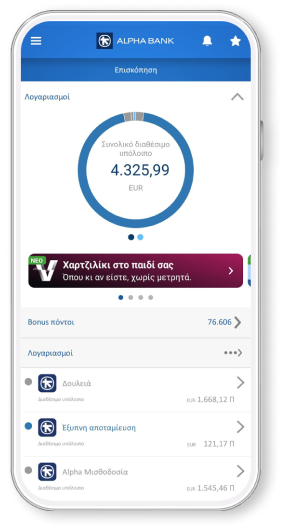
Log into mobile app with your credentials or biometrics. Find your new card on the home screen (Overview).
Attention: If you cannot locate your card on mobile app, log into web banking to add it.
2. Add the new card to your digital wallet
Tap on “Add to digital wallet” to add your new card to the Apple Wallet or Google Wallet.
To complete the process, enter the code you received through text message or email. Otherwise, confirm with biometrics.
If you have a wearable device, you can also add your card to that.
3. Enable online transactions
To be able to shop online, you must also enable the “Shop online” setting.
On the home screen (Overview), tap on your card and then tap on “Settings”.
4. Use your card
Use your new card for your day-to-day transactions at all contactless POS terminals or online. It’s that simple, fast and secure.
When you receive your new card, you can activate it online through your digital banking so you can also use it at ATMs and APS.
No personal digital banking?
Get credentials
From your computer or mobile
If you hold an active Alpha Bank debit or credit card, you can get credentials on the spot, without visiting a branch.
Start banking with us
Online, without visiting a branch
Open your first account with Alpha Bank and get e-Banking credentials online.
Any questions?
Find the answers you need about the virtual use of your card before receiving it.
Which new cards offer the virtual use of card option before actually receiving them?
Personal or business debit, credit and prepaid cards which are:
- Issued for the first time.
- Re-issued with the same number, in case or loss or theft of the card.
Do I retain all the benefits of my new card with the virtual use of card?
Yes, you do (e.g. collecting and redeeming Bonus points, Affinity euros, Energy euros). It applies to all debit, credit and prepaid cards issued by Alpha Bank, with the exception of:
- Aegean Bonus Visa debit card
- Aegean Bonus Visa credit card
- Aegean Bonus Visa Premium credit card
For these cards, you enjoy all the benefits once you receive the actual card and activate it.
If my card is about to expire, can I use the new one virtually before I receive it?
Yes. However, once you activate the virtual use of your card, you can no longer use your old one.
For example, you won’t be able to withdraw cash from ATMs with the card you already hold until you receive your new one.
Bring your bank to your mobile
Download mobile app today and get a bank on your mobile.