







 BACK
BACK
Tourism for All 2026-2027 by Alpha Bank
Financial aid for your holidays

Discover the features
1 draw, 2 phases
The results of the draw are listed on 2 tables, 1 with the beneficiaries and 1 with the applicants who were not drawn.
If you are a beneficiary, you can use the aid amount in one go or for partial transactions up until 30.06.2027.
If you are among those who were not drawn, you are listed on the table in ascending order, according to your unique draw number, and may be selected for the 2nd phase of the programme.
If you are selected, you can use the aid amount in one go or for partial transactions up until 31.12.2027.
You may find the tables on the website of the Ministry of Tourism.


Who it’s for
You can apply for the Tourism for All 2026-2027 aid, provided you:
- Pay taxes in Greece.
- Have submitted a final income tax return for 2024 on time and the tax return has been cleared by the final deadline for submitting applications.
- Are single or widowed and your personal income is between €21,000 to €46,000, depending on the number of children.
- Are married or have a civil partner and your family income is between €33,000 to €58,000, depending on the number of children.
- Were not entitled to the Social Tourism 2026-2027 programme by the Public Employment Service (DYPA).
- Had not won the draw for the Tourism for All 2025 programme.


Up to €600 for your holidays
When you apply for the programme, you choose the tourist season you are interested in and receive the corresponding aid amount.
Low season – October through April
- €300
- €400 for families with children or dependants, and for pensioners
- €600 for people with disabilities or parents with children with disabilities
If you have 4+ children, you get +€50 for each child, from the 4th child onwards.
High season – May through September
- €200
- €300 for families with children or dependants, and for pensioners
- €400 for people with disabilities or parents with children with disabilities
If you have 4+ children, you get +€50 for each child, from the 4th child onwards.
Easy management
This is a digital card; there is no actual card. The aid amount is paid into it.
You add it to your digital wallet and use it:
- At POS devices
- Online, using the card details


For specific transactions
You can use your card for POS transactions at hotels, camping sites and other hotel businesses.
Anywhere in Greece
Choose any destination in Greece you want, without any restrictions.


Apply for the programme


1. Log into gov.gr
Choose Tourism for All 2026-2027 on the dedicated gov.gr vouchers platform.
Choose “Log into the app” and fill in your Taxisnet credentials to log in.
2. Register details, holiday period and provider
Enter:
- Your mobile phone number where the digital card will be activated. Your mobile must be NFC-enabled.
- Your email.
- The period when you want to use the aid: low season (October-April) or high season (May-September)
Choose Alpha Bank as your preferred provider, even if you do not bank with us.
3. Confirm your details
Confirm that you:
- Are not entitled to the Social Tourism 2026-2027 programme by the Public Employment Service (DYPA) – irrespective of whether you have used the benefit or not.
- Had not won the draw for the Tourism for All 2025 programme.
- Will use the amount exclusively to pay for accommodation expenses, for you or your dependent family members.
- Will use the amount exclusively during the period you’ve registered for.
- Will not transfer the amount to a third party or withdraw it.
- Have checked your details are correct.
Submit your application.
4. Verify your mobile number and email
Verify your:
- Mobile number using the 6-digit code you receive on your mobile via text message.
- Email using the 6-digit code you receive on your email.
Once you’ve received the Tourism for All 2026-2027 aid
I bank with Alpha Bank and have digital banking credentials
To access your card:
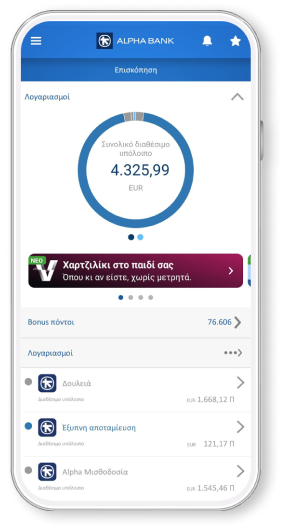
- Choose “Login with credentials” on the mobile app overview page to log in using your digital banking credentials (username and password).
- Find your new virtual Tourism for All Visa card on the overview page (under “Cards”).
- Choose “Add to Google Pay” or “Add to Apple Wallet”, to add it to the digital wallet you prefer.
I bank with Alpha Bank, but I don’t have digital banking credentials
To use your new virtual card, you get your digital banking credentials (username and password) by email/text message on the contact details you provided to Alpha Bank.
Through digital banking, you will be able to view all the products you hold with Alpha Bank. When you activate your digital banking, you fully and unconditionally accept the e-Banking terms of transactions.
To access your virtual card:
- Download myAlpha Mobile on your mobile for free.
- Choose “Login with credentials” on the mobile app overview page to log in using the digital banking credentials you received by email/text message. Do not choose “Sign up to e-Banking” or “New customer”.
- Find your new virtual Tourism for All Visa card on the overview page (under “Cards”).
- Choose “Add to Google Pay” or “Add to Apple Wallet”, to add it to the digital wallet you prefer.
I don’t bank with Alpha Bank
To use your new Tourism for All 2026-2027 Visa card, you get your digital banking credentials (username and password) by email/text message on the contact details you provided to Alpha Bank.
To access your digital card:
- Download and install the mobile app on your mobile for free.
- Choose “Login with credentials” on the overview screen to log in using the digital banking credentials you received by email/text message. Do not choose “Sign up to e-Banking” or “New customer”.
- Find your new Tourism for All Visa digital card on the overview page (under “Cards”).
- Choose “Add to Google Pay” or “Add to Apple Wallet”, to add it to the digital wallet you prefer.
No personal digital banking?
Get credentials
From your computer or mobile
If you hold an active Alpha Bank debit or credit card, you can get credentials on the spot, without visiting a branch.
Start banking with us
Online, without visiting a branch
Open your first account with Alpha Bank and get digital banking credentials online.
Explore other options


Any questions?
Find the answers you need for the Tourism for All 2026-2027 programme.
Do I have to bank or start banking with Alpha Bank to get the Tourism for All 2026-2027 aid?
Can each family member apply for the Tourism for All 2026-2027 aid separately?
Yes, provided you:
- Meet the income criteria.
- Have their own Taxisnet credentials.
- File a tax return.
I do not bank with Alpha Bank, but I got digital banking credentials from a digital card on a previous state aid programme. Can I use them to activate the Tourism for All 2026-2027 Visa digital card?
Yes, provided the programme is still active.
Log into the mobile app or web banking with the digital banking credentials you had created for the previous state aid programme. Your new Tourism for All 2026-2027 Visa card will appear on your digital banking.
If you’ve forgotten your credentials, find out how to recover your username or password.
Bring your bank to your mobile
Download mobile app today and get a bank on your mobile.