BACK
BACK
Youth Pass virtual card
Financial aid for young people

Discover the features
Who it’s for
The Youth Pass Visa card is for young people who:
- Have turned 18 or 19 years old in the calendar year prior to the year they apply.
- Are tax residents of Greece.


€150 a year
Up to and including your 19th year of age.
If you turned 18 in the year prior to the year you apply, you’ll receive the aid for the next year too. You don’t need to submit a new application once you turn 19.
Easy management
This is a virtual card; there is no actual card. The aid amount is paid into it.
You add it to your digital wallet and use it:
- At POS devices
- Online, using the card details


To spend at specific businesses
As long as they are active in the culture, tourism and transport industries.
For example: airlines, car rental, hotels, camping sites and other tourist accommodation, trains, taxis and buses, ferry tickets, travel agencies, bookshops, cinema, theatre, dance studios, orchestras and bands, museums and exhibitions, gyms.


Apply for the Youth Pass

1. Log into gov.gr
Every year, until 23:59 on 15 May:
Choose the Youth Pass on the dedicated gov.gr vouchers platform.
Choose “Log into the app” and fill in your Taxisnet credentials to log in.
2. Register your mobile number, email and provider
Fill in your:
- Tax number.
- Mobile phone number where the virtual card will be activated. Your mobile must have NFC technology.
- Email.
Choose Alpha Bank as your preferred provider, even if you do not bank with us.
3. Confirm your details
Consent to the solemn declaration for the details you filled in and submit your application.
Then verify your:
- Mobile phone number using the 6-digit code you received by text message on your mobile.
- Email using the 6-digit code you received on your email.
When you get the Youth Pass
I bank with Alpha Bank and have digital banking credentials
To access your virtual card:
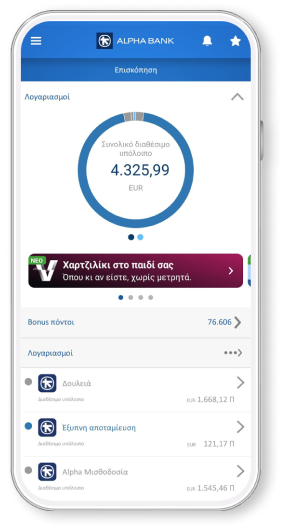
- Download the mobile app if you haven’t already installed it on your mobile.
- Choose “Login with credentials” on the app to log in using your digital banking credentials (username and password).
- Find your new Youth Pass Visa virtual card on the overview page (under “Cards”).
- Choose “Add to Google Wallet” or “Add to Apple Wallet”, to add it to the digital wallet you prefer.
I bank with Alpha Bank, but I don't have digital banking credentials
To use your new Youth Pass Visa virtual card, you receive your digital banking credentials (username and password) by email / text message to the contact details you have provided to Alpha Bank.
Through digital banking, you’ll be able to view all the products you hold with Alpha Bank. When you activate your digital banking, you fully and unconditionally accept the digital banking terms of transactions.
To get access to your Youth Pass Visa virtual card:
- Download and install the mobile app on your mobile.
- Choose “Login with credentials” on the app to log in using the digital banking credentials you received by email / text message. Do not choose “Sign up to e-Banking” or “New customer”.
- Find your new Youth Pass Visa virtual card on the overview page (under “Cards”).
- Choose “Add to Google Wallet” or “Add to Apple Wallet”, to add it to the digital wallet you prefer.
I don’t bank with Alpha Bank
To use your new Youth Pass Visa virtual card, you get digital banking credentials (username and password) by email / text message to the contact details you provided in your Youth Pass application at vouchers.gov.gr.
If you had chosen Alpha Bank to receive other financial aid on a virtual card that is still active, you need to use the digital banking credentials you had received then. If you have forgotten them, contact us on +30 210 326 0000.
To get access to your Youth Pass Visa virtual card:
- Download and install the mobile app on your mobile.
- Choose “Login with credentials” on the app to log in using the digital banking credentials you received by email / text message. Do not choose “Sign up to e-Banking” or “New customer”.
- Find your new Youth Pass Visa virtual card on the overview page (under “Cards”).
- Choose “Add to Google Wallet” or “Add to Apple Wallet”, to add it to the digital wallet you prefer.
No personal digital banking?
Get credentials
From your computer or mobile
If you hold an active Alpha Bank debit or credit card, you can get credentials on the spot, without visiting a branch.
Start banking with us
Online, without visiting a branch
Open your first account with Alpha Bank and get digital banking credentials online.
Explore other options


Any questions?
Find the answers you need about the Youth Pass Visa for young people aged 18-19.
Do I have to bank or start banking with Alpha Bank to get the Youth Pass?
Why do I need the mobile app?
To use your virtual Youth Pass Visa card.
Through myAlpha Mobile, you can view your card details and add it to your Google Wallet or Apple Wallet to use it at a POS device.
Bring your bank to your mobile
Download mobile app today and get a bank on your mobile.