










 BACK
BACK
Money on your card with Visa+
Just with your mobile number

Why use Visa+
From Visa to Visa
Visa+ is a simple and fast way to receive money on your Alpha Bank Visa in Greece or abroad. All you need to do is give your mobile number.
You can activate it online from your mobile or computer and create your own Visa+ profile. Receive money directly on your Visa card, provided the sender’s bank supports Visa Direct.


Fast and secure
Your mobile number is all you need to receive money through Visa+. This way you can carry out transactions faster and feel more secure, as you are not sharing your:
- Card details
- IBAN
Cost-free
Can I use Visa+?

Activate it provided you...
- Hold an Alpha Bank Visa debit, credit or prepaid card.
- Have e-Banking credentials.
How can I add my card to Visa+?
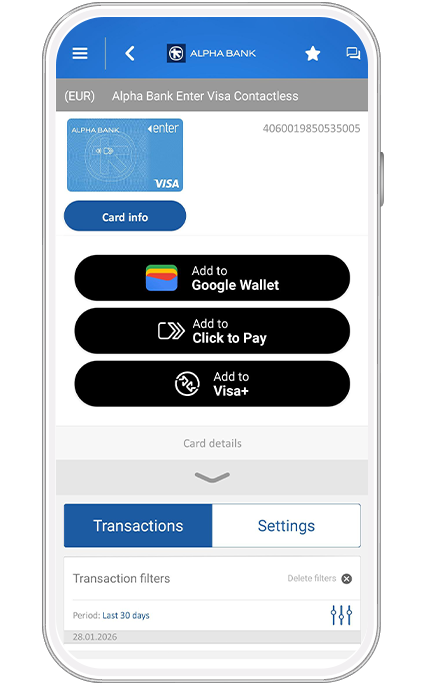
1. Choose Visa+
Log into your e-Banking.
On myAlpha Mobile, on the main menu, tap on “Cards”.
Find the card you want and tap on “Add to Visa+”.
On myAlpha Web, from the menu on the top left, choose History > Cards. Find the card you want to add and click on “Add to Visa+”.
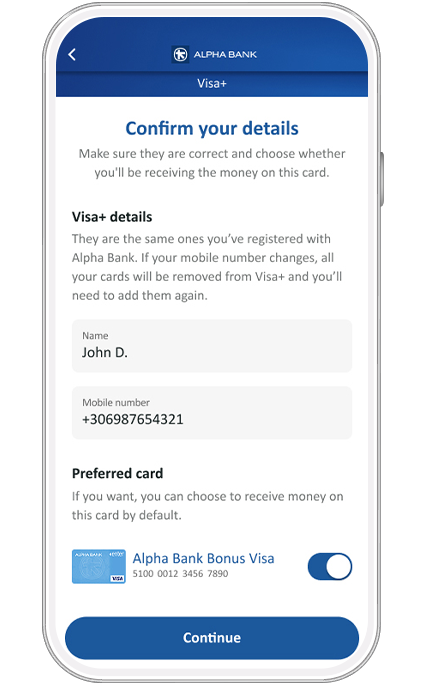
2. Confirm details and choose card
View your details for Visa+ and check that your mobile number is correct. If it is not, find out how you can update it through your e-Banking.
Choose “Get Visa+”.
On myAlpha Mobile, verify that your name and mobile number are correct, and choose the card you want to receive the money on. Choose “Continue”.
Tap on “Confirm” to confirm your preferred card.
On myAlpha Web, verify that your name and mobile number are correct.
Choose the card you want to receive the money on and click on “Continue”.
Choose “Confirm”.
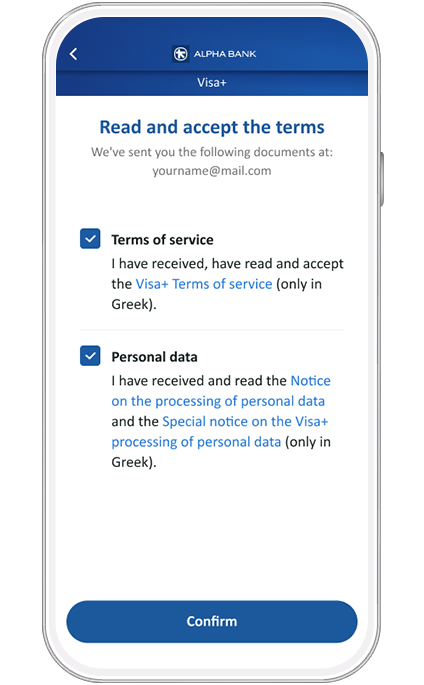
3. Accept the terms
Read and accept the terms and the notice on the processing of personal data.
Choose “Confirm”.
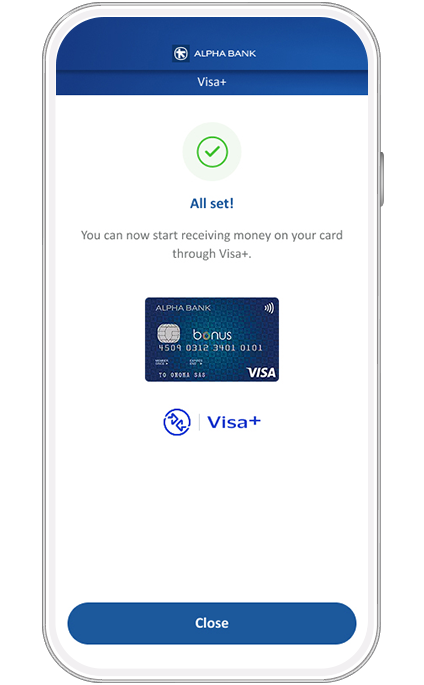
4. Activate Visa+
Enter the 6-digit code you receive on your mobile through Viber / text message. Choose Continue > Close to conclude the process.
You have activated Visa+ for the card you chose.
No e-Banking?
Get credentials
From your computer or mobile
If you hold an active Alpha Bank debit or credit card, you can get credentials on the spot, without visiting a branch.
Start banking with us
Online, without visiting a branch
Open your first account with Alpha Bank and get e-Banking credentials online.
About your protection


How we protect you
How to protect yourself
What you must look out for
Bring your bank to your mobile
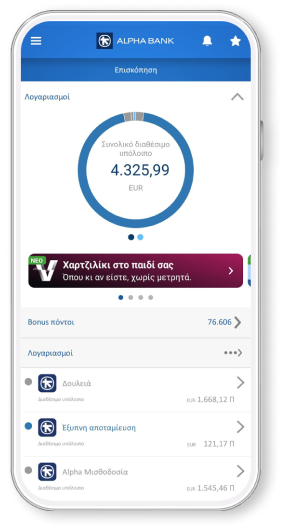
Download mobile app today and get a bank on your mobile.




Any questions?
Find the answers you need about Visa+.
Can I send money with Visa+?
Can I remove my card from Visa+?
Yes. Through your mobile phone, using myAlpha Mobile:
- Choose the card you want to remove.
- Tap on “Remove card”.
- Enter the 6-digit code you receive on your mobile through Viber / text message.
- Tap on “Close” to conclude the process.
From your computer through myAlpha Web:
- On the left menu, choose History > Cards.
- On the Visa+ field, choose “Edit”.
- Find the card you want to remove and click on “Remove card”.
- Click on “Confirm” to confirm the removal of your card.
- Enter the 6-digit code you receive on your mobile through Viber / text message.
Click on “Close” to conclude the process.
Can I change my preferred card through Visa+?
Yes. Through your mobile phone, using myAlpha Mobile:
- Choose “Visa+” through any card you've added on Visa+.
- Find the card you want to set as preferred and swipe the slider to the right. Tap on “Save”
- Confirm the change of your preferred card.
- Enter the 6-digit code you receive on your mobile through Viber / text message.
- Tap on “Close” to conclude the process.
From your computer through myAlpha Web:
- On the left menu, choose History > Cards.
- On the Visa+ field, choose “Edit”.
- Tick the box next to the card you want to set as preferred.
- Choose “Confirm”.
- Enter the 6-digit code you receive on your mobile through Viber / text message.
- Click on “Close” to conclude the process.